AI assistant for Dolibarr:ask your ERP, have it draft an order or dictate it by voice
EasyAI adds an assistant to Dolibarr that works on your real data. It answers, builds the report with its chart and its Excel file, and drafts quotes, orders or invoices with the permissions of whoever is using it. Before validating, sending or deleting anything it shows you what it is about to do and waits for your yes.
For management, accounts, sales and the warehouse. Ships with Mistral, the European provider.
Requirement: the EasyAPI module installed and enabled (sold separately).
EasyAI is the AI assistant module for Dolibarr made by EasySoft Tech S.L. It adds a chat, and a voice conversation if you want one, where you query the ERP, ask for reports and create documents in plain language. It reads and writes through the EasyAPI module with the permissions of the logged-in user, and anything it is about to write appears first on a confirmation card. The assistant is called KIWI out of the box, and the name can be changed.
EasyAI quick facts
Maker
EasySoft Tech S.L.
Type
A Dolibarr module, installed from a ZIP
Requirement
The EasyAPI module enabled (sold separately); version 2.39 or later to limit agents by area
Dolibarr
15 to 24 (tested on 15, 18 and 24)
PHP
7.1 to 8.4
AI provider
Mistral by default; also Anthropic (Claude), DeepSeek and any OpenAI-compatible service, including a local model with Ollama
AI usage cost
You pay your provider with your own key; we charge nothing for usage
Live voice
Optional and off by default; it uses a separate voice service and needs HTTPS
Languages
Eight: Spanish, English, French, German, Italian, Portuguese, Catalan and Galician
Price
€390 + VAT, one-off payment
Updates
365 days included
Current version
1.72.0
What the AI assistant does inside Dolibarr
The data is already in Dolibarr. Getting it out on time usually depends on whoever is good with list views and Excel, and creating an order means knowing which screen everything lives on.
Ask your ERP in your own words
Monthly sales, margin per product, stock per warehouse, customers who have stopped buying. The answer comes as a table with its chart and an Excel file to download, and the report is saved under “My reports”. The AI never writes SQL: it picks from a closed catalogue of data that the server checks before running anything.
It creates the documents for you
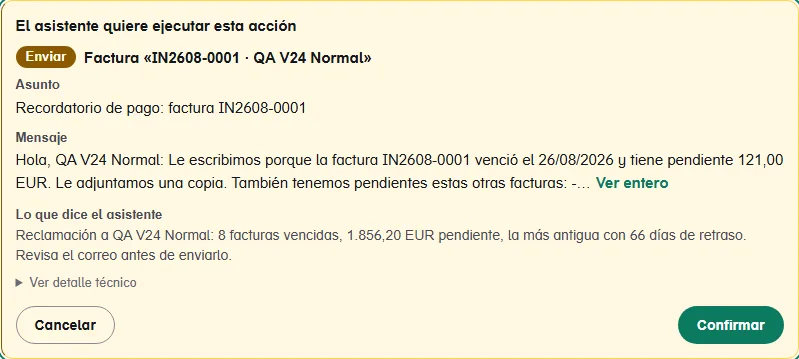
It creates third parties, quotes, orders and invoices through EasyAPI, with the permissions of the logged-in user. Before writing, it shows a card with what it is actually about to do, the lines and the total, and when it finishes it leaves you the link to the record.
You talk to it like on a phone call
With the voice conversation you say what you need and it answers out loud straight away. You can interrupt it, and to create or change something it asks for a “yes” that you can say out loud. It works in the chat and in the mobile app.
It answers from your own manuals
If you use Dolibarr’s Knowledge Management, it searches your validated articles and the documents you upload, and tells you which one the answer came from. It finds the right one even when you ask with different words or in another language.
What each team asks it
Management
“Monthly sales for this year”
“Which product gives me the best margin?”
“Top 10 customers”
Accounts
“Which customers owe me the most?”
“Show me my latest invoices”
/chase
Sales
“Create a draft quote for…”
“How much have I invoiced this customer?”
/customer
Warehouse
“Which products are below minimum stock?”
“Order for the usual customer: ten boxes for Monday”
/order
The phrases with a slash are quick commands or skills: type “/” in the chat and the list appears.
Talk to Dolibarr: orders by voice
You press the conversation button and talk to the assistant like on a phone call. It listens, answers out loud and you can cut in mid-sentence. With a headset on, whoever is picking the goods can dictate the order without putting down what they are holding.
What you ask of the ERP is done by the usual assistant, or by the agent you choose, with your permissions and with the AI provider in the configuration.
To create or change something, the card appears on screen and you answer “yes” or “no” out loud, or with the buttons.
It repeats the result as it is: exact figures, names and references, without adding statuses or prices that are not there.
When you hang up, the conversation is in the chat in writing. It also works in the mobile app.
Before you turn it on
It is off by default, also after an update.
It uses GPT-Live, OpenAI’s real-time voice service, with its own key. The key is stored encrypted and never reaches the browser.
The audio goes through that service, and personal data masking does not cover the voice. The settings page warns about this.
Your Dolibarr must be served over HTTPS: without a secure connection the browser will not give access to the microphone.
Voice minutes count towards each user’s monthly spending cap.
If you would rather not use live voice, the dictation microphone types what you say into the box using the browser’s own speech recognition, with no external service.
The voice conversation
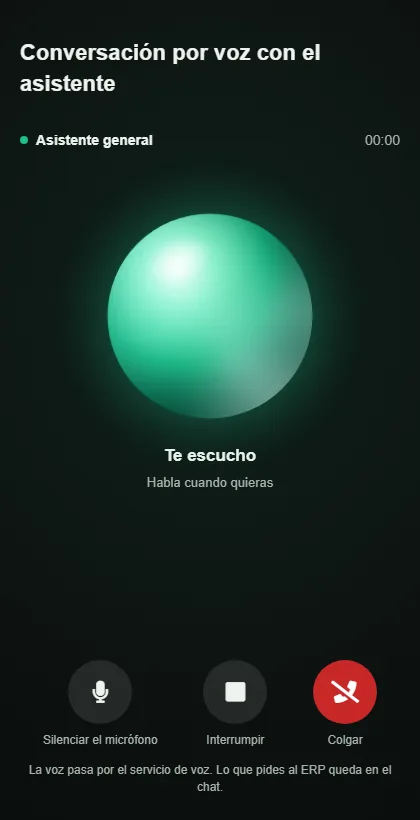
It opens full screen from the chat. The sphere changes as it listens, thinks or speaks, and tapping it cuts the assistant off.
AI agents per area, each with its own job
Besides the general assistant you can create agents: one that prepares orders, another that answers pricing questions, another that only looks at stock. Each one has its instructions, what it can touch, what it looks up in the knowledge base and who can use it.
Choosing who to talk to
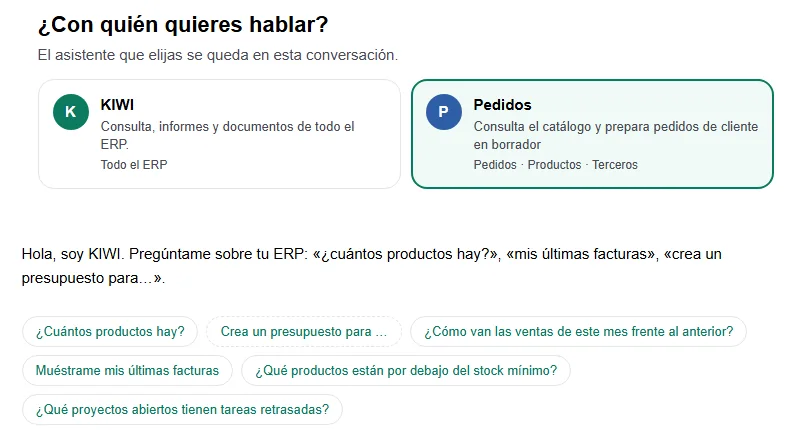
When you start a chat, there is one card per assistant showing what it works on. The conversation stays with the one you pick.
One level for each area of the ERP
None
The agent cannot see that area.
Read
Read only.
Create and edit
It writes, but never deletes.
Everything
It can also delete.
Within each area you can fine-tune by parts: Orders on “Create and edit” with their lines on “Read” only, or Invoices with no access except payments. The server checks it operation by operation, so an agent with Products on “Read” will not change a price even if asked to. Each agent can also answer with its own AI model.
How each agent works
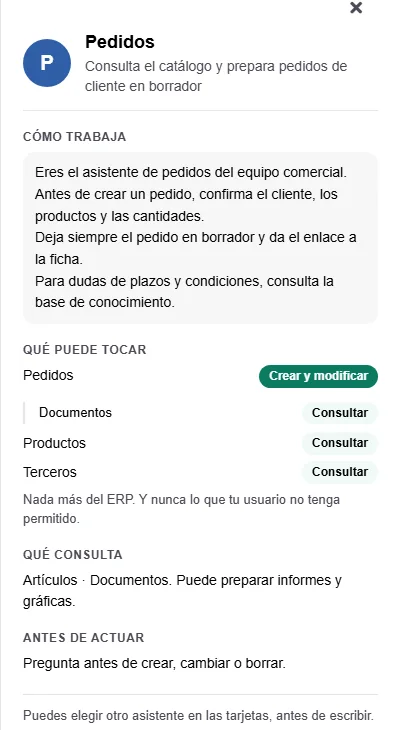
Whoever uses it sees its instructions, what it can touch at which level and what it asks before acting.
Skills: how things are done in your company, written in plain text
A skill is a task explained the way you would explain it to a new colleague: what to do, in what order, what to ask and what to leave alone. The assistant uses it when it matches what it is asked, even if nobody names it.
Sample skill
When to use it: when someone asks for a materials order for a customer
“If no customer is given, it goes to the usual customer. The products are these ten, with their id. Create the order as a draft with the delivery date they give. Do not validate anything.”
With the code order, typing “/order” in the chat runs it.
Fast mode, if you want it. For a flow that is always the same, the server runs the steps in a single call: it finds the customer, reads the price of each product from the ERP and leaves the order ready for a single card. It understands dates said as “tomorrow” or “in 15 days”.
Try it without writing. The Try button runs the real reads and shows what it would write, without creating anything.
History. Every change keeps a copy that can be restored, including that of a deleted skill.
From the chat. Whoever administers EasyAI can say “turn what we just did into a skill” and review it on a card before saving it. A skill never deletes and follows the usual permissions and areas.
The Skills tab
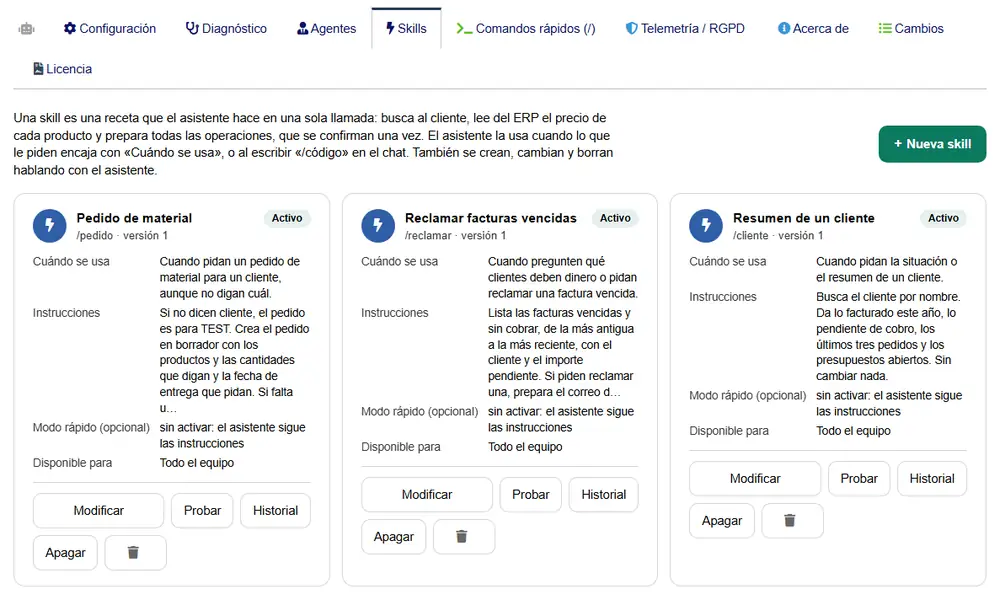
Each skill with its code to run it with “/”, when it is used, its instructions and who it is available to. From here you test it, turn it off or bring back an earlier version.
You decide how much it does on its own
Connecting an AI to the ERP raises a fair question: how far can it go? EasyAI acts as the user who is using it. If that user cannot see supplier invoices, neither can the assistant.
The confirmation card
What is going to happen, to which record and with what data. Nothing happens until you press Confirm.
EasyAI controls over what the assistant does
Autonomy
Three modes: queries only, confirm every write (the recommended one) or confirm only critical actions.
Always confirmed
Validate, send, collect payment and close, in any mode. Each one is a tick box and they come ticked: a voice order agent can create and validate without asking if you untick “Validate”.
Deleting in the ERP
Always asks for confirmation, and the user also needs the delete permission.
The card
The module builds it from the operation that is about to run. If the assistant says one thing and the operation does another, the card shows the operation.
Data it has not seen
If it is about to write a customer, an amount or a reference that has not come up in the conversation, it stops and asks.
Data does not give orders
A customer note that says “delete this customer” is treated as data. This protection cannot be turned off.
Activity log
Every operation by the assistant is recorded with date, user, action and status.
Spending
Cost in euros per user, a monthly cap and a limit of messages per hour.
Whoever administers EasyAI also sees under each answer how long it took, and in the Agents tab the averages for the last 30 days per assistant and channel.
AI provider, GDPR and the EU AI Act
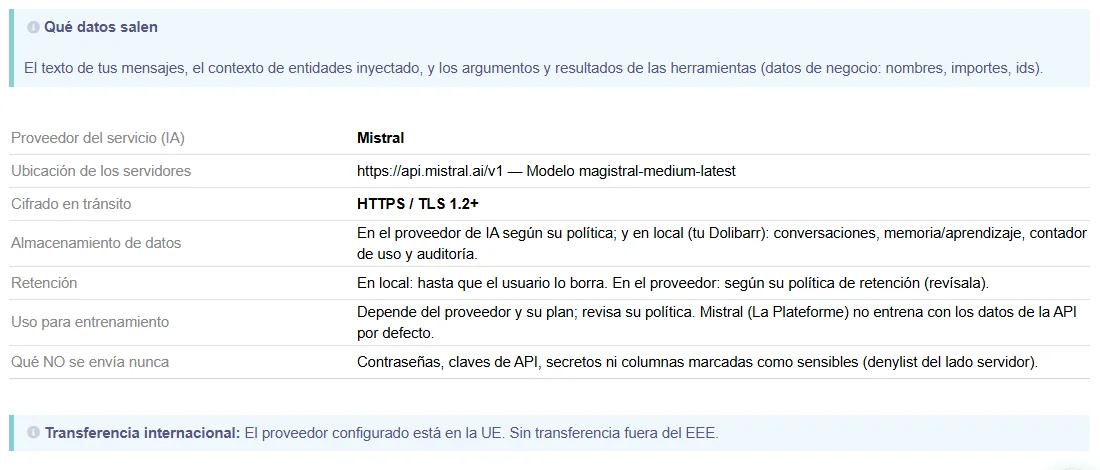
Mistral by default. It is European and processes data in the EU. You can also use Anthropic (Claude), DeepSeek or any OpenAI-compatible service, including a local model with Ollama, where the data never leaves your infrastructure. With most providers the model is picked from a live list, and each agent can have its own. The voice conversation is separate: its audio goes through OpenAI’s service.
If you choose a provider outside the EU, the settings warn you and you can mask emails, phone numbers, IBANs and tax IDs: they go to the provider as placeholders and the assistant puts them back when it answers.
Each user gives consent the first time, after reading what data is sent and to which provider. The chat tells users they are talking to an AI, emails sent by the assistant carry the X-AI-Generated header and, by default, it does not rank or score workers.
What is stored in your Dolibarr is deleted automatically once it goes past the period you set for conversations and the activity log. Passwords, keys and sensitive columns are never sent.
The transparency tab
What is sent, where to, how long it is kept and how to exercise GDPR rights, ready to show anyone who asks.
Who EasyAI is for
A good fit if…
You already use Dolibarr and want the less technical part of the team to work with it by talking.
You ask for the same reports every month and put them together by hand in Excel.
You have repetitive tasks, such as materials orders, that could be dictated.
You want to decide what the AI can touch and have the important steps go through a person.
Not a fit if…
You do not use Dolibarr and do not plan to.
You do not want to install EasyAPI, the module it reads and writes through.
You are looking for a website chatbot to serve your customers. EasyAI works for your team, inside the ERP.
You do not want a key with any AI provider and do not want to run a local model.
EasyAI pricing: €390 + VAT, one-off payment
No subscription. It includes 365 days of updates and the full source code; when they run out, the module keeps working. The current version is 1.72.0.
What is included
The chat, the voice conversation, agents and skills.
Reports with charts and Excel, and the knowledge base.
Voice minutes, if you turn on the voice conversation.
The server and the Dolibarr implementation, if you do not have it yet.
How to buy it
Tell us what you want it to do, we tell you whether it fits and we set it up with you: provider, permissions and, if you need them, your first agents and skills. It is also on Dolistore.
Frequently asked questions about the AI assistant for Dolibarr
What is EasyAI?
A module by EasySoft Tech S.L. that adds an artificial intelligence assistant to Dolibarr. It answers questions about your data, builds reports with charts and Excel files and drafts documents such as quotes, orders or invoices, by chat or by voice. It works with the permissions of the logged-in user and asks for confirmation before critical actions.
Can it create orders and invoices in Dolibarr?
Yes. It creates third parties, quotes, orders and invoices through EasyAPI, with the permissions of the person using it. Before writing it shows a card with the lines and the total, and when it finishes it leaves the link to the record. Validating, sending, collecting payment and closing ask for confirmation in any mode, unless the administrator unticks one of them.
Can I talk to Dolibarr by voice?
Yes, with the voice conversation. You talk to the assistant like on a phone call, it answers out loud and you can interrupt it. What you ask of the ERP is handled by the assistant or the agent you choose, with your permissions, and writes appear on a card that you confirm by saying “yes” or “no”. It is off by default and needs the ERP to be served over HTTPS.
Which service does the voice use, and what data goes through it?
The voice uses GPT-Live, OpenAI’s real-time voice service, with its own key that is stored encrypted and never reaches the browser. The audio and what the assistant says out loud go through that service; personal data masking does not cover the voice. Whatever has to be looked up or done in the ERP is handled by the AI provider in the configuration.
What is an agent in EasyAI?
An assistant with a specific job: its own instructions, what it can touch in the ERP and what it looks up. Each area (Orders, Invoices, Products…) gets a level: None, Read, Create and edit, or Everything. The server enforces it operation by operation, whatever the conversation says. Choosing areas needs EasyAPI 2.39 or later.
What is a skill?
The way your company wants a task done, written in plain text as you would explain it to a person. The assistant picks it on its own from its “when to use” or with /code in the chat. With the optional fast mode, a fixed flow such as a voice order runs in a single call. A skill never deletes and prices always come from the ERP.
Which AI providers can I use?
Mistral, the default, with its servers in the EU; Anthropic (Claude); DeepSeek; and any OpenAI-compatible service, such as the OpenAI models behind ChatGPT, Groq or a local model with Ollama. Each agent can use a different model from the same provider.
Does my data leave the EU?
With Mistral, the default provider, processing happens in the EU. If you choose a provider outside the EU, the transparency tab says so and you can mask emails, phone numbers, IBANs and tax IDs so they are not sent in clear. With Ollama the data stays on your own infrastructure. Passwords, keys and sensitive columns are never sent.
Does it comply with the EU AI Act?
The module covers what falls on the tool: the chat tells users they are talking to an AI, each user gives consent before first use, emails sent by the assistant carry the X-AI-Generated header and, by default, it does not classify or score workers. Your company’s obligations as the deployer remain yours.
How much does the AI usage cost?
The module costs €390 + VAT, one-off. You pay the AI usage to your provider with your own key, and it depends on the model and how much you use it. EasyAI works out the cost in euros per user, lets you set a monthly cap and caches the fixed part of each request to spend less. Voice minutes count towards the same cap.
Why does it need EasyAPI?
Because EasyAI does not go into the database on its own. It reads and writes through EasyAPI with the same permissions and checks as any other integration, so it follows the rules of your Dolibarr. EasyAPI is sold separately.
Which Dolibarr versions does it work with?
Dolibarr 15 to 24 and PHP 7.1 to 8.4. Every release is tested on Dolibarr 15, 18 and 24.
How is it different from AgenticOS?
EasyAI is a module you install inside your Dolibarr and it works with it. AgenticOS is our virtual employees service, which also works from Telegram or email and with other ERPs. If you already use Dolibarr and want to talk to it, EasyAI is the one that fits.
Can I adapt it to my case?
Yes. You get the full source code, and a lot can be changed from the settings without touching code: the assistant’s name, its tone, company rules, agents, skills and quick commands.
+200proyectos entregados
+6 añosde experiencia
12países
Free initial analysis
Fixed-price quote, no surprises
Reply within 24 hours
No minimum term
Get your team talking to Dolibarr
We help you get it running: EasyAPI, the AI provider, each person’s permissions and, if you need them, your first agents and skills. If you are not sure it fits, tell us about your case and we will tell you.
Compatible with Dolibarr 15 to 24 · Full source code · Updated on 6 November 2026
Reply within 24 h
🐾EasySoft Tech S.L. assistant
AI · may be wrong
🍪
Cookies & privacy
We only use the technical storage needed for the cart and chat to work. We don’t enable analytics or marketing unless you allow it. Cookie policy · Privacy
Preferences
NecessaryEssential for the cart, chat and security.