
AgenticOS · virtual employees for your business
Forget the office paperwork. You just give it the OK.
Send it the invoice on Telegram, snap a receipt, or just ask how much you’re owed, like you would with someone in the office. Your virtual team reads it, checks it and gets it ready in your ERP, Dolibarr or whatever you use. And nothing hits your books until you say yes.
- Your own install, nobody else’s
- A validator checks the numbers
- Pause them whenever you like
- Supplier
- Example Supplier Ltd
- Lines
- 3
- Net
- €1,240.00
- VAT 21%
- €260.40
- Total
- €1,500.40
Message them where you already message, like any colleague:
- Telegram
- Signal
- Slack
- Discord
- Matrix
Any given Tuesday
What’s waiting for you when you open your laptop
They get on with it, and when something needs your call, they wait. Anything in yellow is on you.
- 07:40Email deskYour inbox summary is ready, with four replies drafted.
- 08:05AdministrationIt read a supplier invoice and it adds up. Waiting for your approval.
- 08:12AdministrationA scanned invoice has no tax ID on it, so it flags it for you to check.
- 09:30CommunicationsA technical question comes in through the website and goes to Support.
- 09:31Technical supportIt answers from your warranty manual and says where it found it.
- 11:15SalesThere is a quote in Dolibarr, as a draft. Your turn to approve it.
- 12:00ManagementYou ask how much you are owed and it tells you, straight from the ERP.
An example day. What happens in yours depends on your workload.
The team
Each one sticks to its job, and they all know when to check with you
No need to take on all six. Start with one, see if it really takes work off your plate, and go from there.
Administration
- Picks up the invoice from your inbox or the chat: a PDF, a phone photo or an e-invoice
- Pulls out lines and taxes, checks they add up and compares every field with the document
- Asks for your approval and leaves it in Dolibarr as a draft
- Does the same with the delivery note, checked against your order, and with the receipt someone paid out of pocket, which becomes an expense claim in their name
Email desk
- Reads your inbox without marking anything as read
- Tells you what came in and what matters
- Leaves replies drafted for you to review
Sales
- Prepares the quote in your Dolibarr
- The validator checks the amounts before anything is saved
- Leaves it as a draft for you
Technical support
- Looks for the answer in your procedures and manuals
- Answers and says where it found it
- If it isn’t written down, it passes it to you
Communications
- Sorts each message by channel, topic and urgency
- Drafts the reply for you
- Sends anything technical to Support
Management
- Answers by reading your ERP: revenue, overdue invoices, stock
- Shares the work out among the others
- Asks you to confirm before anyone touches the ERP
How it fits
It works inside what you already use: your ERP, your inbox, your manuals and whatever else it takes
- Administration
- Email desk
- Sales
- Technical support
- Communications
- Management
recomputes net, VAT and withholding
invoices always; the rest if you switch it on
Dolibarr is where it has the most mileage, but it is not the only place it works. Underneath is an agent platform that connects to almost any tool with an API: another ERP, your CRM, your calendar, a spreadsheet or whatever you use. We look at each connection with you before promising it.
Control
What they never do without asking you
Demos hardly ever show this bit, and it’s what lets you hand things over without hovering. You decide what goes into the ERP and how much each one spends.
- Invoice Example Supplier Ltd · €1,500.40Administration · matches the document
- Quote · 2 lines, draftSales · amounts validated
- Scanned invoice · unclear readThe tax ID is not on the document
No invoice reaches your books on its own
They read it, check it and stop there, waiting for you. Once you approve, it’s created as a draft, and validating and posting it stays with you or your accountant.
A program does the maths
Before touching your ERP, a validator recomputes net, VAT and withholding from the lines and checks tax ID, number, date and amounts against the document.
Stop them whenever you like
From your panel you pause one of them or the whole team at once. They stop answering and spending right then.
Each one has a budget
At 80% of the month it warns you, and if it hits the limit it pauses itself. No nasty surprises at the end of the month.
Your data stays at home
We set up a complete system just for you, sharing a database with nobody. Whenever you want, we give you a readable copy of everything that’s yours, or delete a specific document.
They don’t pretend to be people
Communications and Support, the two that talk to outsiders, say they are an automated assistant. If someone asks, they tell the truth, and you choose the wording.
Your panel
What it looks like from the inside
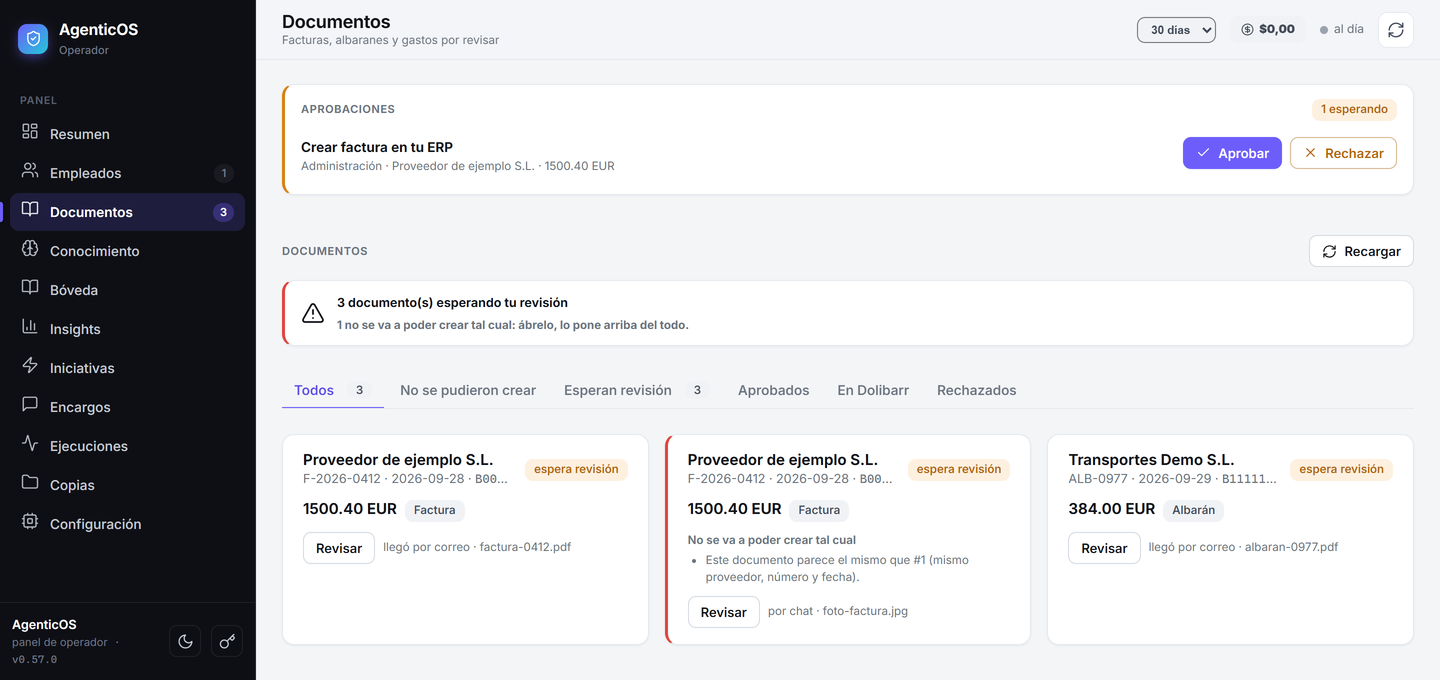
This is the real panel, not a mock-up. At the top, what’s waiting for your OK. Below, the document queue: here it caught an invoice that arrived twice, by email and over chat, and won’t let it through.
Getting started
How we get you up and running
- 01
We install it
We set up your whole system, just for you. You share it with no other client.
- 02
We connect it
To your ERP, your inbox, the chat you’ll use to talk to them and any other tools it needs.
- 03
We set up your team
Each employee with its role, its channel, its spending limit and how far it can decide on its own.
- 04
And you’re in charge
From your panel you approve, pause, explain how your business works and see everything they touched in the ERP.
Terminology
Is this what they call an “agentic ERP”?
“Agentic ERP” is the new term for software that is not just a record-keeping system: an AI agent works inside it — reading, preparing and writing with permissions, always under your approval. It is not an assistant that tells you what to do; it is a virtual employee that acts, with limits, in your system. That is what this page is: employees per role, each with its own job, permissions and budget.
Use case · Collections & overdue
The use case that solves the most: chasing overdue invoices
The Management agent already reads the overdue items in your ERP and answers “how much is pending for collection”. On that basis, Collections prepares the overdue report and the claim drafts with deadlines and interest properly calculated. Sending is always up to you.
Fit test · 30 seconds
Is AgenticOS for you?
Four quick questions and we’ll tell you which employee to start with.
Where do I talk to my team?
On Telegram, WhatsApp, Signal, Slack, Discord, Matrix or email, in plain language and with no commands — you ask as you would ask a person. Teams and Google Chat are not supported yet. And a warning about WhatsApp: it needs a separate number registered with Meta’s business API, Meta approves the application and that takes from days to a couple of weeks. Telegram takes ten minutes.
Does it only work with Dolibarr?
No. Dolibarr is where it has the most mileage and where everything on this page works as shown. Underneath is an agent platform that connects to almost any tool with an API, so it can work with another ERP, your CRM, your calendar or your spreadsheets. What we don’t do is promise a connection we haven’t looked at: tell us what you use and we’ll tell you what can and can’t be done.
Can an invoice reach my books on its own?
No. The team reads it, extracts the data, checks it adds up and stops. It waits for your approval. Once you approve, it is created in your Dolibarr as a draft; validating and posting it is down to you or your accountant. Other writes to the ERP — a quote, a customer record — can also go through a prior approval queue: it ships switched off and turns on in a minute.
Can I send an invoice over chat?
Yes: attach the PDF or the photo you took with your phone and ask for it to be filed. It also picks them up from whichever mail folder you point it at. If what arrives is a structured e-invoice (XML), it is not read but parsed field by field, so there is no reading error to make. What it does not do is verify the file’s digital signature, and it says so on the record.
Does it make answers up?
Support answers only with what is written in your documentation and quotes where it found it; when it cannot find it, it says so and escalates. With an empty knowledge base it will escalate everything, so if you hire Support, uploading documentation is not optional. And on invoices the amounts are not the model’s call: a validator recomputes them from the lines and cross-checks them against the document.
Does my data leave my company?
You get a complete install for yourself alone: you share no database with other clients. Reading scanned documents happens inside your own infrastructure. What is a piece of ours is the AI service that powers the employees; if you need to know who provides it for your record of processing activities, we put it in writing and tell you if it changes.
What if an employee runs away with it?
Each one has a monthly budget. It warns at 80% and pauses itself at the limit, so it cannot keep spending in silence. On top of that you can pause any of them — or the whole team — from your panel, without asking anyone.
Does it replace my team?
No. It does the repetitive paperwork and stops exactly where judgement is needed: you approve the invoice, you send the email, you approve the quote. What it takes away is the hours spent retyping a PDF into an ERP.
Shall we start with one?
Tell us which paperwork eats your week and we’ll tell you, no strings attached, what you can let go of now and what has to wait.