
The MOT lives in a file nobody opens
A vehicle grounded, a fine and a morning lost at the test centre because the date was written down somewhere else.
EasyFleet puts your fleet inside the Dolibarr you already use: due dates that give notice on their own, real consumption, expenses and cost per vehicle. Drivers record from their phone, even offline, and the QR card shows only what you decide.
For delivery, construction, vehicle rental, freight and field sales teams.
Open demo, no sign-up · user demo · password demo · twelve sample vehicles
This is what a vehicle looks like in EasyFleet
Delivery van · sample data
Consumption
6.9 l/100 km
Cost this year
€4,912
EasyFleet is the fleet management module for Dolibarr from EasySoft Tech S.L. It brings each vehicle together with its paperwork, kilometres, fuel, expenses and cost, and works out MOT, insurance, tachograph and maintenance dates from the vehicle data. It installs as a standard module without touching the core, and adds a driver app and a QR card with a configurable public page.
| Maker | EasySoft Tech S.L. |
|---|---|
| Type | A standard Dolibarr module: installed from a ZIP, does not touch the core |
| Dolibarr | 16 to 24 |
| PHP | 7.4 to 8.5 |
| Database | MySQL, MariaDB or PostgreSQL |
| Languages | Eight, all of the ones Dolibarr ships |
| Permissions | Seven of its own, from read-only to costs and settings |
| Driver app | Installed from the mobile browser; works offline |
| Price | €290 + VAT, one-off, no monthly fee and no charge per vehicle |
| Updates | 365 days included |
| Current version | 1.0.2 |
| Demo | demo.easysoft.es · company “Gestion de flota (EASYFLEET)” · user and password demo |
The spreadsheet is not the enemy: it is free and you already have it. The trouble starts when there are several of you, data arrives by messaging app and nobody knows which version is the good one.
A vehicle grounded, a fine and a morning lost at the test centre because the date was written down somewhere else.
Without litres and kilometres there is no consumption, and without consumption you cannot tell which vehicle really costs you money.
A photo someone copies by hand when they remember. Maintenance arrives late and consumption comes out wrong.
The difference is not having a list of plates: it is whether the data lives where the invoices, the suppliers and the accounts already are. Two rows go to the spreadsheet, and there is no harm in saying so.
| Spreadsheet | EasyFleet | |
|---|---|---|
| Where the data lives | In a file passed around by email; everyone keeps their own copy | In your Dolibarr, with permissions per person and per entity |
| Who can see it | Whoever has the file | Seven permissions; a driver sees only their vehicles |
| MOT and insurance | Dates written down by hand | Calculated by category and age, with an email reminder |
| Consumption | An average that breaks with one partial fill | Only complete stretches; partial ones are flagged |
| Cost per vehicle | You add up columns and cross-check invoices | Cost per vehicle and period, with leasing kept apart |
| Refuelling | Typed in one by one | Imported from the statement, duplicates detected |
| Tyres | A note of when they were changed | By position, with kilometres and cost per kilometre |
| Driver report | A photo sent by messaging app | The app records it offline and syncs later |
| History | Lost when the file is replaced | Kept in your Dolibarr database |
| Price | €0 for the tool; the hours are yours | €290 + VAT, one-off payment |
| Learning curve | You already know how to use it | There is a new screen to learn |
Both have a cost. The difference is whether the cost shows up on an invoice or in the hours nobody records.
Install from the ZIP and enable it under Modules/Applications. The core and the templates are untouched, and it can be disabled without a trace.
Vehicle types, energy sources, plan and expense types, and the due-date plans for each type.
Vehicle by vehicle or with the Dolibarr import wizard. Before that, leave one row per vehicle and one column per field.
Seven permissions per profile, the app for whoever drives and email notices with the lead time you choose.
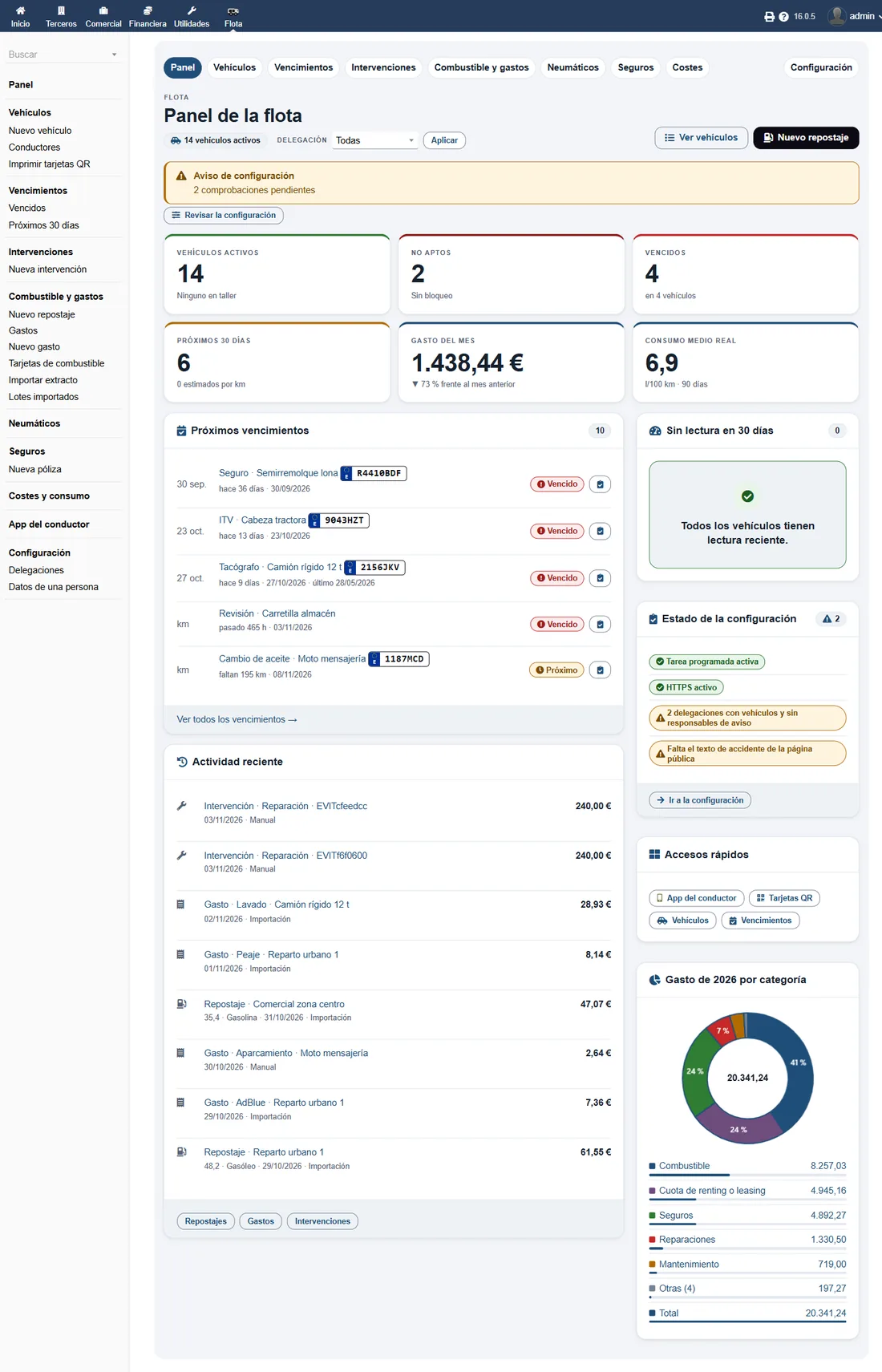
The dashboard
Six figures for the day, what is due and the spending ring by category, with amount and percentage on hover.
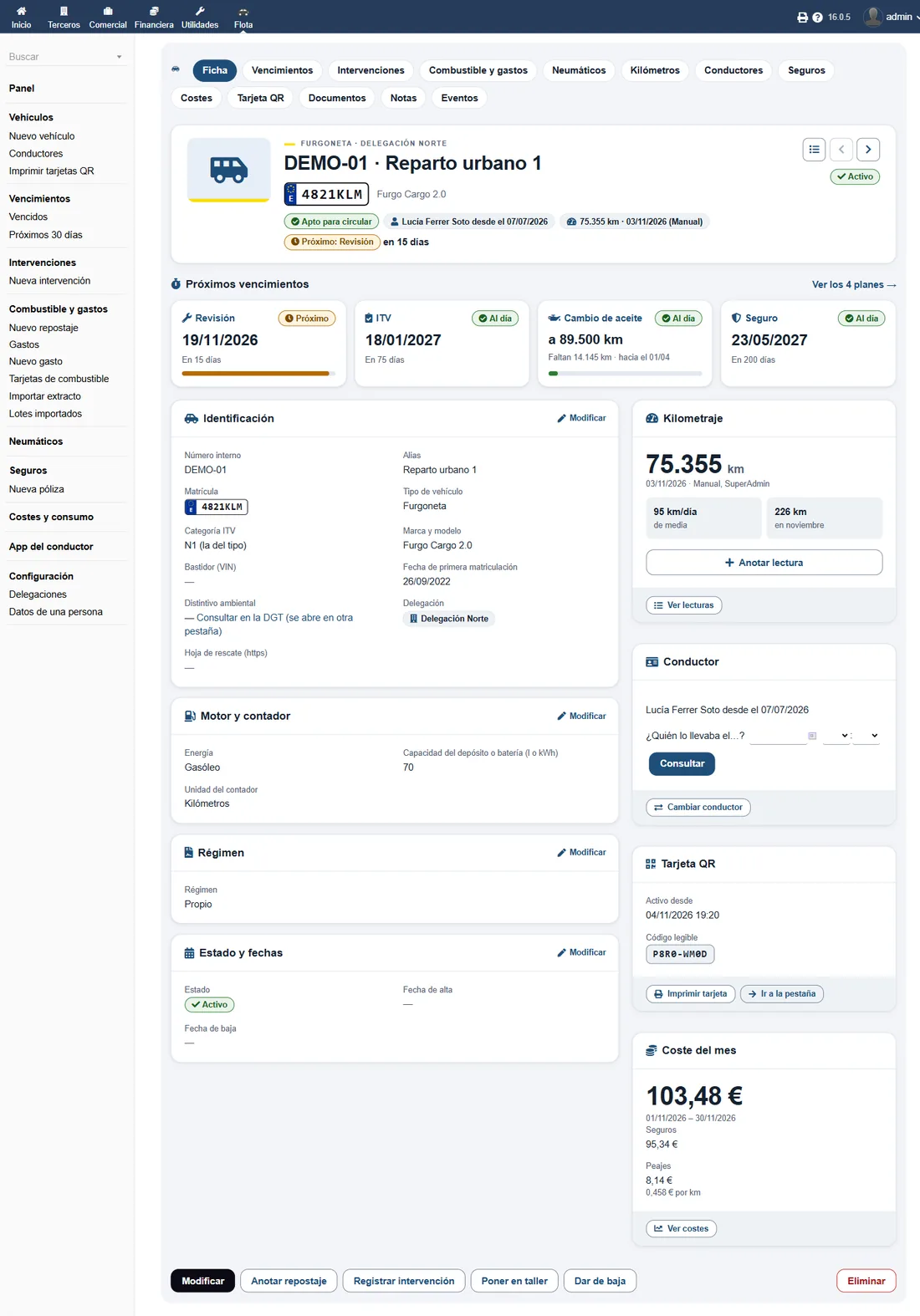
The vehicle record
One record per vehicle with its data, its ownership and its plans up to date, due soon or overdue.
A delivery fleet is not read the same way as a construction one. The module is the same; what changes is what you look at first.
Vans, many drivers and kilometres that never stop. What matters is fuel, insurance, the MOT and that the driver’s report does not get lost.
Machines without plates, hour meters and vehicles spread across sites. What matters is knowing what each machine costs and that an MOT does not stop the job.
Vehicles that come and go, fees with services included and a cost that cannot count twice what the fee already covers.
Tachograph, MOT, insurance and cost per kilometre. If you also issue the DeCA, both modules share the same fleet in Dolibarr.
Company cars, fuel cards and kilometres that mix work and private use. What matters is what each person costs and who can see that data.
We would rather say so than sell you something you do not need.
Drivers sign in with their Dolibarr user and see only the vehicles you assign to them. The public QR page shows no driver detail at all: only the vehicle fields you tick and the phone numbers you type in.
The module includes tools to export, restrict and anonymise one person’s data, and everything is stored in your own Dolibarr database. There is no cloud of ours in between.
No subscription and no fee per vehicle. Includes 365 days of updates and the full source code. The current version is 1.0.2.
Tell us what your fleet looks like, we send you a quote and we install it with you. If you are coming from a spreadsheet, we look at what is worth bringing over before importing.
No. Kilometres come from readings and refuelling, and the app installs from the browser. If you already have GPS, the module is still useful for due dates, expenses and cost.
EasyFleet needs a running Dolibarr. You can have it in the cloud with EasySoft Cloud or installed turnkey by our team.
Vehicle by vehicle or with the Dolibarr import wizard. If the sheet holds years of history, we look at it with you before importing and decide what is worth bringing over.
EasyFleet does its part and lets the others do theirs on the same Dolibarr.
It is the fleet management module for Dolibarr from EasySoft Tech S.L. It brings together vehicles, due dates, fuel, expenses, tyres, insurance, workshop jobs and cost per vehicle, and adds a driver app and a QR card. It installs as a standard module on Dolibarr 16 to 24.
Dolibarr 16 to 24 and PHP 7.4 to 8.5, with MySQL, MariaDB and PostgreSQL. Version 1.0.2 is tested against every version in the matrix before release.
Yes. There is an open demo with twelve sample vehicles, with due dates, refuelling, expenses, tyres, insurance and an imported statement. User and password: demo.
The MOT is calculated from the vehicle category and its registration date, applying the age brackets of each type. The other dates, such as insurance, tachograph, road tax, services and oil, follow the same pattern. Each plan sends an email with the lead time you configure.
Yes. Each vehicle has its service and oil plans, and workshop jobs are recorded with the garage, the cost and a link to the supplier invoice. Tyres are tracked by position with their cost per kilometre.
No. Kilometres come from manual readings and from refuelling, with daily and monthly averages, and the module flags impossible jumps and vehicles with no reading. EasyFleet does not track vehicles or install hardware, and the app does not ask for location unless you enable it in the settings.
The module stores the fee and the services it covers. What the fee already pays for is not added to the vehicle cost, so nothing is counted twice, and the cost can be read by period and by category.
Yes. It installs from the phone browser and whatever is recorded stays on the phone until the network is back; if the driver taps twice, nothing is duplicated. Each driver signs in with their Dolibarr user and sees only their vehicles.
Only what you decide. You can switch the whole page off, choose a full, partial or hidden plate and enable one by one the alias, model, MOT, insurance, tachograph, maintenance, phone numbers, 112 and accident text. Driver details are never shown.
No. The EasyFleet one is attached to the vehicle and opens a public record for that vehicle. The DeCA one belongs to the transport control document and is managed in EasyDocControl, the other module.
Yes. Loading can be done vehicle by vehicle or with the Dolibarr import wizard. Before importing, leave one row per vehicle and one column per field: plate, type, make, model, registration date, odometer and ownership.
It is a one-off payment of €290 + VAT, with no monthly fee and no charge per vehicle, with 365 days of updates and the full source code. The demo comes with twelve sample vehicles so you can try it first.
Yes. Vehicles, suppliers, invoices and permissions live in Dolibarr, and workshop jobs can link the supplier invoice. If you use VeriFactu, invoice reading or accounting, each module does its part on the same database.
The module can block it as unfit and keeps a record of who lifted the block. That way it is not used by mistake and the decision leaves a trail.
It covers the administrative side: due dates, documents, fuel, expenses, cost per vehicle and the driver app. It does not replace GPS or telemetry, and it does not do route optimisation or workshop management.
Yes. Each vehicle can be assigned to a branch or cost centre with its notification contacts, and data is separated per entity. Each contact receives what concerns them.
A driver sees only their vehicles and their details never appear on the public QR page. The module includes tools to export, restrict and anonymise one person’s data, and everything is stored in your own Dolibarr.
Yes. You receive the full source code and can read it, change it and adapt it without asking permission.
We stay with you through the roll-out: installation, dictionaries and due-date plans, loading vehicles and branches, and the permissions for each person. If you are coming from a spreadsheet, we look at it with you before importing.
AI · may be wrong